

 View Basket (


 Time Attendance Systems
Starting from:
£895.00
Typical Package
ActIn Time Software 75 employee, UK Proximity Terminal, 25 Proximity Badges, FREE Sage Payroll ODBC Integration, 12 month's warranty
- £895.00
ActIn Time Lite 2016 – SQL Employee Management System
- Overview
- Reviews
- Features
- Packages
- Hardware
- Screen Shots & Reports
- Accessories
- Buy Now
- Attendance
- Absence
- HR
- Flexitime
- Job Costing
- ESS & TWC Web Portal
- Payroll Export
- Reports + Generator
- Fire Roll Call
- Employee Self Service
- Scripting
- Access Control
- Assembly / Mustering
- Health & Safety
- Free Sage Link
- Upgrade
Overview
ActIn Time


ActIn Time is the UK's leading British manufactured SQL Time & Attendance workforce management system for small to medium businesses.
This product suite contains everything you need, to help you efficiently organise and maintain accurate staff records in one simple, easy to use software package for up to 75 staff.
Simply follow the 4 easy steps in the packages TAB, to build the Time and Attendance system that suits your requirements.
It is also advisable to read the “10 Most popular questions we get asked” to help you decide
which Time & Attendance Management System is right for you (CLICK HERE).
Database Platform
The software is shipped with the FREE Microsoft SQL engine or can be installed onto a SQL Server. No SQL knowledge is required. There are massive all round benefits of SQL over other platforms, which is why Microsoft has encouraged software houses over the last few years, to develop on this platform. SQL secures your most sensitive employee records for safe keeping, helping organisations maximise their protection to comply with the Data Protection Act.
Main Modules
SQL Benefits
Clocking Terminals
The software can communicate to an array of different clocking terminals, giving customers the ultimate flexibility in customising their package.
Suitability and Scalability
Suitable for mail order self-installation with telephone support guidance or onsite installation and training available.
Simple software upgrade path to unlock more features, should they be required for future expansion.
Specification
 Personnel |
 Attendance |
 Absence Management |
 Access Control |
 Wizards |
 Fire Alarm Roll Call |
 Reports |
 ESS |
 To-Do List |
 Hardware |
ActIn Time Services  |
ActIn Time agents are responsible for a number of key tasks:
The Event Handler looks after the system maintenance and manages scheduled events throughout the day.
The Fire Roll Call agent is responsible for monitoring your fire alarm system whilst collecting information from the hardware and delivering it to the SQL database on the server.
The Calculation Agent is the workhorse behind the product – it is responsible for processing the data in the exact way each client requires.
The Employee Self Service (ESS) / The Web Client (TWC) facilitates individuals that use the intranet/internet features within ActIn Time.
The Terminal Enquiry Agent processes any special requests, such as a real-time flexi balance, made by employees at the terminal.
The Data Collection Agent is a new service we've added which is dedicated entirely to the gathering of clocking data and the updating of hardware when changes are made within the software.
And finally, the Email Agent handles all ActIn Time email alerts. |
Packages
ActIn Time Lite 2016 - Build your system in 4 easy steps
Your Time and Attendance System is but a few easy steps away.
Step 1 - Simply choose or decide your ActIn Time package
All our ActIn Time packages include: 1 x Multi User Software (3 clients)**, 1 x Clocking Terminal
3 Metre Network Cable, 12 Months Warranty and FREE delivery except the Proximity package which also includes 25 Key Fobs or Cards
Step 2 - Decide on additional time and attendance clocking terminals /
hardware you would like to connect to your ActIn Time system
Click HERE to view the comprehensive range of hardware available for
your ActIn Time system. Alternatively click the Hardware tab above.
Step 3 - Choose your ActIn Time add-ons' or accessories
Accessories
Bespoke Programming
Step 4 - Decide how you would like your ActIn Time system installed
Buy Now
If you require help on choosing the right system for you, please click on our Packages tab for further information.
ActIn Time Lite 2016 - Build your system in 4 easy steps
Upgrade to ActIn Time 2016

Want more Time & Attendance features?
Then why not talk to one of our sales representatives today on:
020 8882 4522 to arrange a demonstration.
Alternatively
Click HERE for more information on: ActIn Time 2016
Features | Modules
If more additional users or features are required than stated, please call.
| ActIn Time Software (single user) |
ActIn Time Lite Junior |
ActIn Time Lite |
ActIn Time |
| Employee Limit – Employee limit |
Up to 75 |
Up to 75 |
Unlimited |
| True Multi-user – Total of concurrent users accessing the system can also be installed on a server | Single user, maximum of 3 licences in total | 3 users included, maximum of 5 in total | 999 (client licences included) |
| SQL - Shipped with the FREE SQL MSDE but can it be installed on a SQL Server | Yes | Yes | Yes |
| Multi Site Capabilities – Multiple site access and reporting | Yes | Yes | Yes |
| Multi Terminals – facility to add multiple terminal hardware of different types | 3 | 5 | 999 |
| Attendance – Type of Shifts - Fixed, Rotational, Flexitime, Flexible, Continental etc | Entry Level | Limited | Full |
| Overtime – How many overtime pots can the system handle? | 5 | 10 | 20 |
| Monitoring – Lateness, core time infringements, overtime, breaks etc | Entry Level | Limited | Full |
| Absence Management – Includes Entitlement and Tracking Analysis plus Yearly Absence Chart with clashing facility | Entry Level | Limited | Full |
| HR / Personnel – Disciplinary, Appraisals, Job Specifications, Qualifications, Vehicle, Education, Health, Interview, Accidents, Medical, Secondary Employment etc | Entry Level | Limited | Full |
| Rostering – Staff roster planner for more complicated shift rotations | No |
Limited | Full |
| Training Matrix – Manage employee's Training and Qualifications to see what they have accomplished and what is still left for the employee to achieve. | - | Limited | Full |
| Asset Management – Create, manage and store important information regarding machinery and equipment used within the company. | - | Limited | Full |
| Job Costing – Track time spent on jobs and operations by employees | No |
Limited | Full |
| ESS/TWC/Internet/Intranet – Employee self service information point at the PC on internet/intranet | No | Limited | Full |
| Payroll Export – Export of hours worked ready for payroll link e.g. Sage, Pegasus etc | Entry Level | Full | Full |
| Exporting – Facility to export reports | Entry Level | Limited | Full |
| Report Generator – Ability to customise or add new report templates | No |
Limited | Full |
| Fire Roll Call – List employees on/off site in the event of a fire and link into a fire alarm panel for automatic printouts | Entry Level | Full | Full |
| Email Me Alerts – Automatic confirmation alerts after management decisions i.e. confirmation of absence acceptance/declined etc | No |
Limited | Full |
| Scripting – Bespoke customisation for tweaking any special requirements that the system can’t do as standard | Entry Level |
Limited | Full |
| Access Control – Restrict doors/barriers/turnstiles from the outside world | No |
Limited | Full |
| Assembly/Muster Points – Fire assembly self service check in points | No |
No | Full |
| Health & Safety – Various features to keep one step ahead of the regulations | No | Limited | Full |
| System Alerts – Automatic software and email alerts for system critical failures | No | Limited | Full |
| Services – Software can be installed to auto run as a pc service for auto downloads | Yes | Yes | Yes |
| Mobile Me – Utilise smart phones to clock in/out & access data | No | Limited |
Full |
Specifications are subject to change to improve the range.
Hardware
Print Hardware List
Features(driven by relay) |
Touch Screen Time &
|
||||
  |
Touchscreen TerminalsProx or Finger Card or Fob Capacity 5,250 employee capacity 9,500 archive record capacity Communication Network connection: RJ45 (10/100) USB (optional) GPRS (optional) |
 |
||
Features |
Face Recognition Time & Attendance Terminals
|
||||
 |
|
Chinese Face RecognitionFace OnlyFace and Pin Face and Card / Fob Capacity 200 face template capacity 10,000 employee capacity 100,000 archive record capacity Communication Network connection: RJ45 (10/100) USB Built In GPRS Modem Optional WiFi Optional |
|
|
Features |
Face Recognition Time & Attendance Terminals
|
||||
 |
|
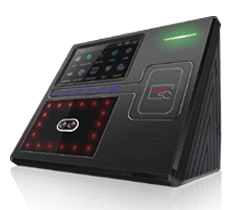
Chinese iFace 401 Face RecognitionFace OnlyFace and Pin Face and Card / Fob Capacity 400 face template capacity 10,000 employee capacity 100,000 archive record capacity Communication Network connection: RJ45 (10/100) USB Built In GPRS Modem Optional WiFi Optional |
|
|
Features |
Hand Punch Time & Attendance Terminals
|
||||
 |
|
Hand Punch TerminalsHand & Pin Hand & Prox (Some Models) Optional Door Access Control Option GPRS Modem Capacity Employee Range 50, 100, 512 Communication Network connection: RJ45 (10/100) GPRS Modem Optional |
|
|
Features |
Access Control
|
||||
 |
|
Access Control TerminalsCapacity 5,250 employee capacity 9,500 archive record capacity Communication Network connection: RJ45 (10/100) USB Optional GPRS Modem Optional |
|
|
Features |
Fire Alarm Monitor
|
||||
 |
|
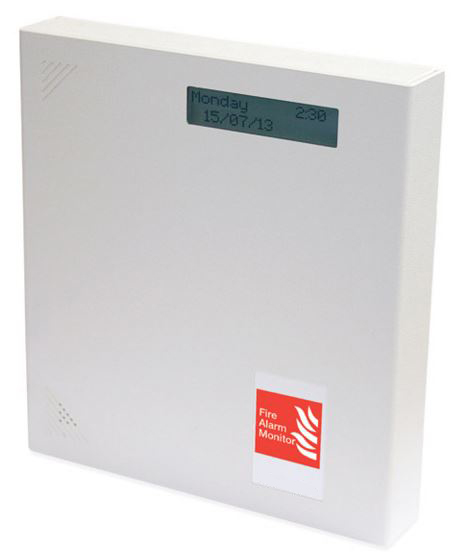
Fire Alarm Monitor TerminalCapacity 15,000 employee capacity 9,500 archive record capacity Communication Network connection: RJ45 (10/100) USB Optional GPRS Modem Optional |
|
|
Features |
Muster Point
|
||||
 |
|
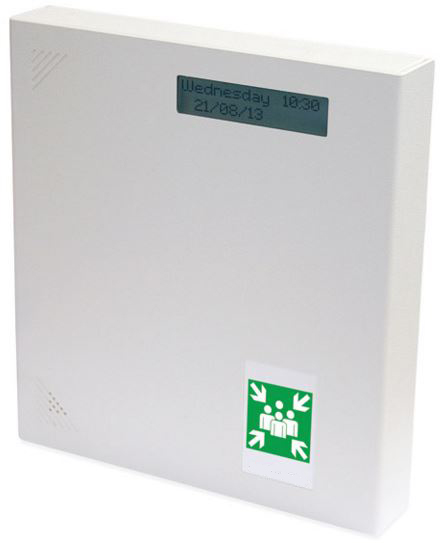
Muster Point TerminalCapacity 15,000 employee capacity 9,500 archive record capacity Communication Network connection: RJ45 (10/100) USB Optional GPRS Modem Optional |
|
|
ActIn Time - Screen Shots & Reports
|
Personnel |
To-Do |
Attendance |
 Absence Statistics |
Reports |
Fire Alarm Roll Call |
ActIn Time - Reports
 Weekly Clock Card |
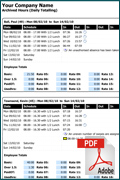 Archived Hours |
 Absence Weekday Analysis |
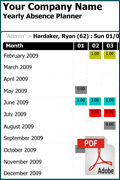 Yearly Absence Planner |
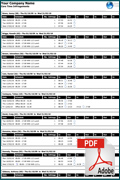 Core Time Infringements |
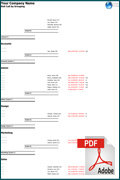 Roll Call By Grouping |
Add Ons' and Accessories

'Bolt On' Time & Attendance extra's include:
| Employee Cards / Fobs |
||||
 |
|
Proximity Cards Proximity Key Fobs Magnetic Swipe Badges |
|
|
| Card Racks |
||||
 |
|
Range of Card Racks Plastic Metal |
|
|
| External Biometric Readers |
||||
 |
|
External Biometric Reader Finger Only | Finger and Pin |
|
|
| External Readers |
||||
 |
|
Array of Readers available Magnetic Readers Barcode Readers Proximity Readers |
|
|
| USB Registration Devices |
||||
 |
|
USB Fingerprint Desktop Registration Device Scan & Enroll |
|
|
| |
||||
 |
|
USB Proximity Registration Device Scan & Enroll |
|
|
Attendance

How can ActIn Time attendance help my business?
Firstly, not all systems are designed to our high standard. ActIn Time has spent
over twenty years developing a sophisticated attendance product that alerts users
to several basic, yet important facts;
Next, to enhance the employees’ use of the system, we added several real-time request
facilities at the attendance terminal (which include);
ActIn Time - Attendance Screen Shots
 Tables |
 Daily Schedule |
 Schedule Time Pots |
 Schedule Script Editor |
 Period Schedule Allocation |
 Period Schedule Pay Period |
 Terminal Settings |
 Terminal Roll Call |
 Personnel Period Schedule |
 Personnel Attendance Terminals |
 Planner pt 1 |
 Planner pt 2 |
 Planner pt 3 |
 Adjustments Link |
 Adjustments |
 Adjustments pt 2 |
 To-Do Missed Bookings |
 Adjustment Authorisation |
 Reports |
ActIn Time - Attendance Reports
 Weekly Clock Card |
 Archived Hours |
 Attendance Bookings |
 Daily Totals |
 Monthly Attendance |
 Flexitime Hours & Balance |
Absences

How can ActIn Time Absence Management help my business?
What would happen if all the fork-lift drivers were on holiday at the same time? Or the first aiders? or the staff qualified to complete key tasks in the workplace? ActIn Time enables line managers to view holiday plans before authorising an absence booking. ActIn Time also keeps track of the types of absenteeism in the workplace as well as monitoring the holidays taken and days booked in advanced.
It’s like a wall chart - but far more detailed!
has been entered correctly.
to keep good staffing levels and ensure that employees cannot take more than their
entitlement.
carried forward from the previous absence year.
ActIn Time - Absence Screen Shots
 Easy Accessible |
 Planner |
 Amend |
 Absence Script in Action |
Individual Statistics |
 Absence Entitlement Credits |
 Holiday Entitlement |
 To-Do Item |
 Scripting Absence Booking |
 Company Statistics |
 Absence Codes |
Absence Statistics |
 Absence Entitlement Periods |
ActIn Time - Absence Reports
 Yearly Absence Planner |
 Absence Entitlement |
 Absence Listing |
 Absence Monthly Analysis |
Absence Weekday Analysis |
 Monthly Absence Chart |
HR
How can ActIn Time Personnel help my business?
The key is having all your information in one easily accessible place. Everything from contact details to medical reviews, vehicle information to yearly appraisals – ActIn Time provides a truly effective solution.
The Personnel features integrate with the To-Do List to provide reminders of important events ranging from birthdays to certification renewal.
In short, ActIn Time Personnel sets the standard for integrated H.R.
other personnel modules.
ActIn Time - HR Screen Shots
 Easily Accessible |
 Essential |
 Personal |
 Groups |
 Accident |
 Job Specification |
 Contact Details |
 Documents |
 Employee Self Service (ESS) |
 Vehicle |
 Health |
 Appraisal |
 Training & Qualifications |
 Education |
 Disciplinary |
 Interview |
ActIn Time - HR Reports
 Appraisal Details |
 Disciplinary History |
Absence Listing |
 Personnel details |
 Training and Qualification Details |
 Upcoming Review Items |
Job Costing


How can ActIn Time Job Costing help my business?
Monitoring costs on the shop floor have been made simpler with the introduction
of ActIn Time integrated job costing module.
Not only does ActIn Time allow costing by job, but it also gives you the flexibility
of costing by department, individual employee and specific operation. By using the performance comparison reports, you can check on the effectiveness of your
employees and highlight areas for improvement.
Logging job details couldn't be easier. An employee simply presses the clearly marked ‘job start’ or ‘job stop’ function buttons on the data collection terminal and follows a series of simple requests such as ‘Enter job number’, or ‘Enter operation’. The terminal keypad may be used although an increasing number of businesses chose to use barcode scanners for increased efficiency.
The data collected by the terminal is passed directly to the ActIn Time software making it instantly available for reports and enquiries. With clear identification for each job and operation, ActIn Time lets you drill down to the exact layer of information you need, making it easy to compare performance and address areas where productivity can be improved
The new data collection terminals run special scripts designed specifically for your business ensuring that the solution provided is perfect for you.
ActIn Time - Job Costing Screen Shots
 Tables |
 Operations |
 Products |
 Customers |
 Menu |
 Jobs |
 Adjustments |
 Bookings |
 Adjustment Anomalies |
 Reports |
 Barcodes |
 Terminal |
ActIn Time - Job Costing Reports
 Job Costing Bookings Employee Based |
 Job Costing Bookings Job Based |
 Job Costing Bookings Over Date Range Job Based |
 Job Costing Downtime |
 Job Details |
 Job Listing |
ESS & TWC Web Portal

ActIn Time ESS – empowering the employee through their PC.
As the workplace becomes increasingly diverse, it is not always practical for
employees to ‘clock-in’ at a conventional clocking-in terminal. For the employee,
the ESS provides the ideal solution, offering the facility to book-in, request time-off
and to check remaining holiday entitlements. For the supervisor, the ESS enables instant access to employee attendance and absence information whilst allowing authorisation of various requests.
them check the status of pending absence requests from home or anywhere on your
network.
the HR department.
a browser on your network.
(or decline), booking and time-off requests.
ActIn Time - ESS & TWC Screen Shots
|
Employee Home |
 Absence Entitlement |
 Who's Having Time Off? |
 Absence Request |
 Cancel a Request |
 Attendance Bookings |
 Attendance Timesheet |
 Submit Job Costing Booking |
 Submit Cost Centre Booking |
 Supervisor Home |
 Supervisor Employee Selection |
 Supervisor Entitlement Check |
 Supervisor Who's Having Time Off |
 Supervisor Attendance Check |
 Supervisor Absence Booking |
 Attendance Display Panel |
Health & Safety

Various features to keep one step ahead of the regulations.
Examples of Health & Safety inc:
ActIn Time - Health & Safety Screen Shots
|
Training Qualifications |
First Aiders Absence Planner |
Job Specification |
Disabilities |
|
 Fire Roll Call Access Control |

Roll Call

The Fire Alarm Roll Call is a standard facility in ActIn Time. By connecting your existing fire alarm system to an ActIn Time terminal, it is possible to generate an instant roll call report and unlock doors in the event of a fire.
Want to know where your employees are right now? The Attendance Display Panel provides a very quick method of displaying each employee’s current location.
Remember that ActIn Time can now provide assembly point terminals located outside the building for fire drills.
with live reporting.
ActIn Time - Roll Call Screen Shots
 Run a report |
 Unlock a door |
 In or Out? |
 Autorun |
 Report by Zone |
 Who is where? |
 Realtime Locator |
ActIn Time - Roll Call Reports
 Roll Call By Grouping |
 Roll Call By Zone |
Access Control

How can ActIn Time Access Control help my business?
It’s not just about security, it’s about knowing who is on-site – and exactly where they are. Permanent staff, contractors and even visitors can be issued different access levels for specific time periods.
In short – you decide who goes where and at what time!
Full auditing is available – find out what time people left the site rather than the time they finished work and who has attempted to access the site outside permitted hours.
Finally, for companies requiring a higher level of security, remember that the access control supports the ActIn Time fingerprint reader technology.
ActIn Time - Access Control Screen Shots
 Zones Menu |
 Zone Description |
 Setup Menu |
 Access Patterns |
 Access Profiles |
 Free Zones |
 Terminal Configuration |
 Terminal Settings |
 Reader Direction |
 Access Control Reports |
 Locator |
 Mustering |
 Access Audit |
 Real-Time Access Activity |
ActIn Time - Access Control Reports
 Access Data Listing Everything |
 Access Data Listing Everything Badge Based |
 Access Data Listing Access Denied |
 Access Time Pairs Totals Per Day |
Payroll

Your Time and Attendance product provides all the information you need to process
your payroll. Now there’s products designed to make that job even easier and
much more accurate.
Payroll Pay-Links are simple but powerful bridge's between Time and Attendance
and your Payroll package. They read the data from Time and Attendance and then
write it straight into a choice of payroll programs including Sage, Pegasus etc.
Say “Goodbye” to endless hours of keyboard data input. Payroll Pay-Links will slash
your payroll processing time and costs to almost nothing, and prevent many payroll errors before they happen. With Payroll Pay-Links, your employees are as good as paid.
Reports + Generator


Implementing a sophisticated workforce management system will undoubtedly improve the efficiency of any business, but the addition of a flexible reporting module will enable the information generated by the system to be shared with a wider audience.
The ActIn Time report module provides over 160 clear and concise, and user editable, reports, forms and graphs as standard
Bespoke, unique reports may be developed when required which can contain any elements of the ActIn Time data including personnel, absence, attendance, access and job costing information.
Powered by Business Objects (SAP), ActIn Time reports are extremely flexible and very reliable – over 4000 UK companies use ActIn Time reports to provide essential information on demand.
Don’t forget ActIn Time 2016 includes an integrated report designer.
Employee Self Service


ActIn Time sees the Employee Self-Service (ESS) features really starting to become a valuable
asset to any HR department. The main advantage for companies providing ESS is that it presents an efficient means of delivering information to employees, completely unattended, twenty four hours a day.
With an increasingly internet savvy workforce, the concept of requesting data from their phone
and receiving updates via email is not new. Similarly, requesting information from the attendance terminal is becoming equally acceptable with more companies allowing staff to send up-to-date holiday entitlements, overtime figures and shift rota's straight to their personal email addresses.
It has also been suggested that ESS is becoming increasingly popular as more businesses
‘go green’ in an effort to reduce paper waste.
There are four standard ESS HR requests that can be made from the ActIn Time attendance terminal:
Holiday Summary
This service provides a complete breakdown of the holiday entitlements, giving the number
of days taken this holiday year, those booked and days remaining. This service is very popular
with companies employing night shift workers who do not have the opportunity to talk directly
with HR.
Hours Worked Summary
As the name suggests, this ESS HR request provides employees with a real-time view of their
hours worked at up to five separate pay-rates. The employee has the choice of viewing four different date periods with the benefit of the knowledge that they can track the exact
hourly figures used by the wages department when calculating their payroll.
Daily schedule rota
Ideal for service industry installations, this ESS HR request provides staff with their planned working schedules for the next two weeks including rest days.
Email-me!
The concept for Email-me! is simple – prove who you are and ActIn Time will instantly forward
all ESS HR information to your
pre-registered personal email address. What makes this even more useful is that if the employee has registered their iPhone or Blackberry email address, they
will have the benefit of receiving all of the above information, in .pdf format, straight to their phone!
Scripting

Customise your ActIn Time system with bespoke scripting.
Most "off the shelf" software packages are governed by restrictions, and can be frustrating. However ActIn Time, being an "off the shelf" software package can cover 98% of customers requirements.
For the remaining 2% of customers, we have enabled the ActIn Time software to be customised
which brings endless possibilities.
Examples of bespoke scripting inc:
Flexitime
Flexitime is a scheme where a company makes it possible to give its employees a flexible
working hours arrangement.
Normally there is a core period of the day under flexitime rules when employees must be
at work (e.g. between 10 am and 4pm). The rest of the working day is "flexitime" in which
staff can choose when they work. This would be subject to achieving total daily, weekly or
monthly hours.
Employees must work between the basic core hours with the flexibility to clock in / out
between the other hours.
A typical example of a flexitime day:
The hours you work between these times are credited to your flexitime balance.
Benefits of Flexitime
Applying a flexitime policy in your company can benefit employers, employees and their families.
Benefits to your organisation:
Working within a flexitime policy could bring the following benefits to your company:
Benefits to your employees:
Disadvantages of Flexitime
These are the issues that ActIn Time resolves.
ActIn Time - Flexitime Screen Shots
 Flexitime Adjustments |
 Flexitime Adjustments PT2 |
ActIn Time - Flexitime Reports
|
Flexitime Hours & Balance |
 Flexitime Balance with Authorisation |
 Flexitime End of Period |
 Flexitime Closing Balance For Specified Period |
Assembly / Mustering

In the event of a fire employees are asked to leave their possessions and without
placing themselves, or anyone at risk, evacuate the building. They must move quickly,
quietly and as orderly as is practical to one of the designated Assembly / Muster Points.
Once at the designated point they must present their badge/fob/finger to be read on an external reader. This enables managers to quickly and easily account for their staff, and act upon any employee not present.
ActIn Time is supplied with a fully automated mustering system including zoning facility.
ActIn Time - Assembly / Mustering Screen Shots
|
Mustering |
ActIn Time Lite - Free Sage Link
Export with 1 click!

ActIn Time is part of the Sage Developers' Programme and offers a True Built-in ODBC Sage Payroll link which, at a click of a single button, exports all mapped rates into Sage, cutting down on admin time and human errors by 95%!
ActIn Time Sage Transfer Process
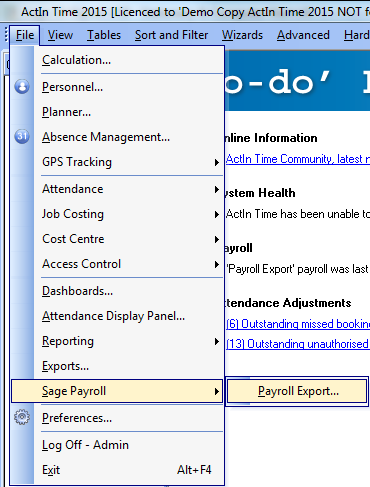 Menu Structure |
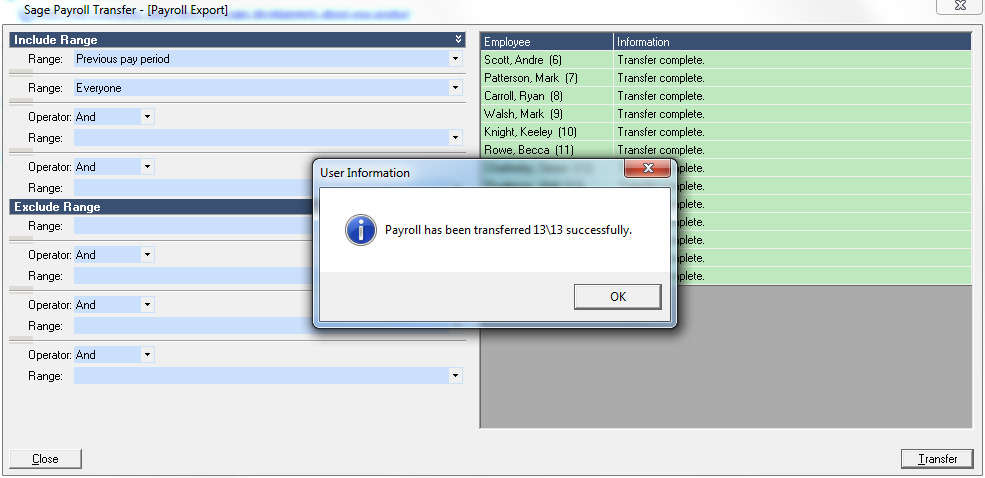 Sage Transfer |
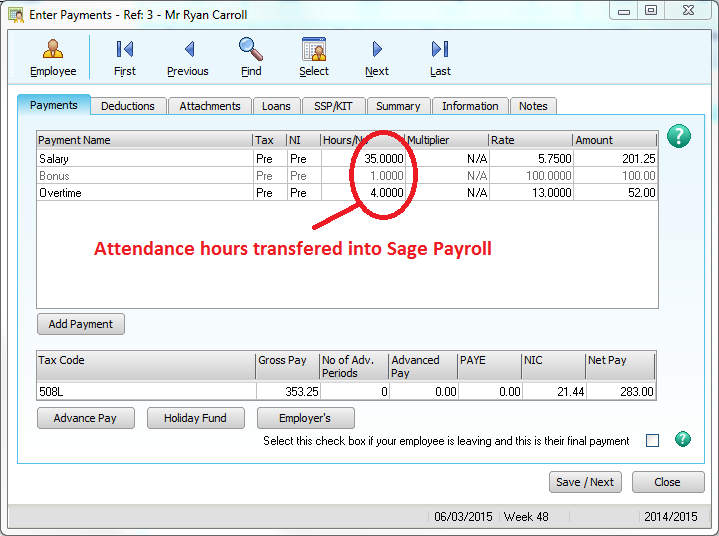 Enter Payments |
ActIn Time Sage Link 1-time Configuration
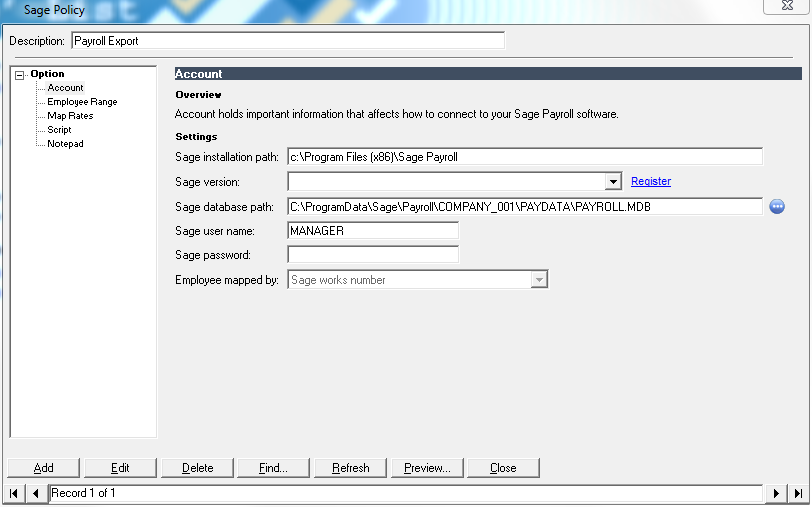 Account Settings |
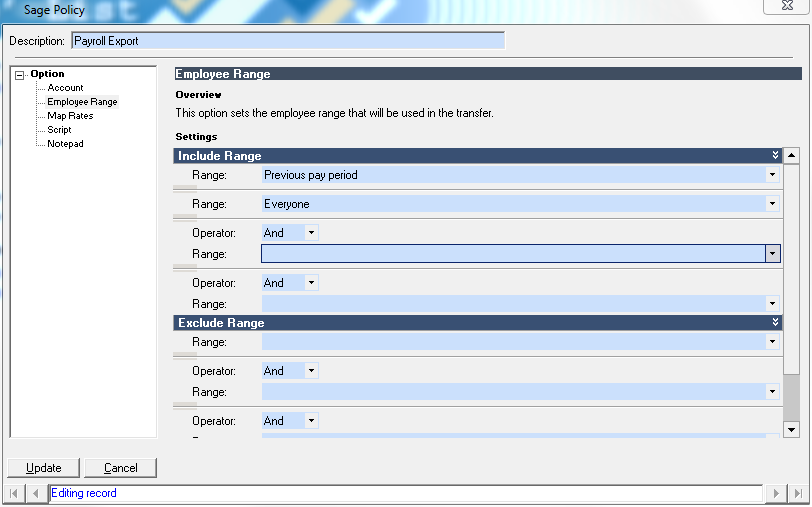 Employee Selection |
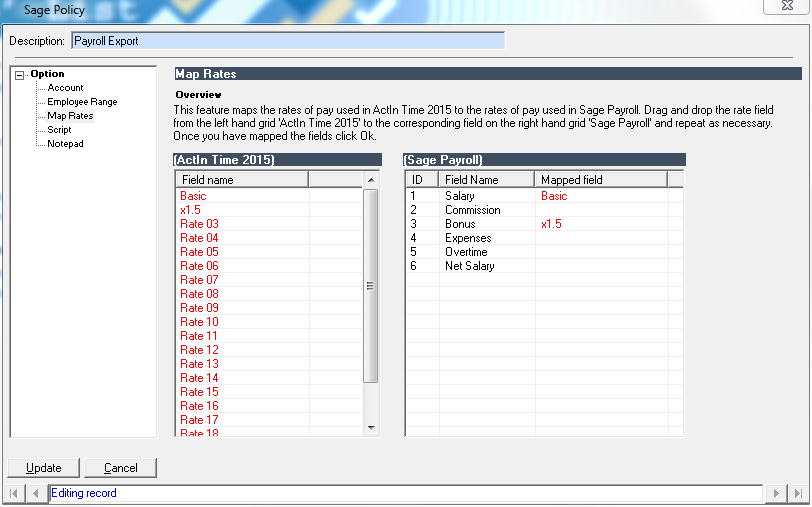 Map Rates |
<
Reviews
In the past we have always purchased basic models for our multiple sites, even though the PC linked system was recommended we thought it was a sales pitch to make us spend more so stuck with the products we knew.
However, in 2010 we decided to take their advice and purchased the PC linked system, at that point we realised that Wisegrove knew a lot more about what we needed than we did.
The PC Linked system makes our life so much easier, the reliability and functionality is second to none and certainly great value for the price we paid. I can honestly say the over the 20 years of dealing with Wisegrove I have never had a problem with their products and the service and professionalism has been 1st class.
David Howard
Managing Director
DW Mouldings Ltd.

We had multiple issues with our old clock in system and it was a breath of a fresh air to be able to use the ActIn Time software. System is very easy to navigate and to alter to suit specific company’s needs.
The installation and set-up process went very smoothly. Many thanks to Mark Walsh who conducted our training and answered all my questions.
Having the EES portal enabled us to say goodbye to paper holiday request forms. The Portal is easy to use and allows everyone to keep track of their bookings and entitlements.
We are still in the process of discovering all the system features. Support desk has got lots of patience and is very helpful. Thank you for all your help guys.
Justyna Thanassoulas
Senior Quality Engineer
Air Bearings Ltd.


